
Building in Public | Market Research, Round 2
TL;DR It’s been nearly two years since my original market research, so I revisited the knitting increase/decrease calculator landscape to see if my app still has a reason to exist. There are more options now, and some of the newer ones are genuinely good. But most still have gaps: confusing terminology, paywalls, limited stitch guidance, unclear flat vs in-the-round behaviour, AI-ish content, or less-than-optimal solutions. The gap is definitely smaller than it was, but I still think there’s room for a thoughtful, human-made calculator built by someone who is both a knitter and a software developer.
It’s been almost two years since I first chose this side project and did my initial market research. That’s long enough for the landscape to have changed quite a bit. So before I put more energy into building anything, I want to revisit what’s out there and ask the same basic question: does this project still fill a gap?
That matters to me because I don’t want to add to the clutter. I would love to make an app and put it out into the world: to support real users, respond to feedback, and improve the tool over time. But I don’t want to publish something if the need is already well covered. I’d rather the App Store had a handful of excellent tools than pages of near-duplicates, and I don’t want to make the search results noisier just because I feel like building something. If there’s already a good solution out there, I’ll step aside and choose a different project.
1 Websites
1.1 Knitulator
No apparent updates since my last report.
1.2 WorldKnits
No apparent updates since my last report.
1.3 YARNSUB
No apparent updates since my last report.
1.4 Knitgrammar
No apparent updates since my last report.
1.5 Hobby Hygge
No apparent updates since my last report.
NEW
1.6 StitchMath
This website's footer lists "© 2025-2026," which suggests the site is fairly new, though footer dates aren't conclusive.

Likes:
The layout is clear and easy to scan, with the main form, guidance, and results visually separated by borders, spacing, and background colour.
The colour palette is easy on the eyes.
I love the little tooltips next to Current stitch count and Target stitch count; the explanatory copy is genuinely helpful.
I love the callout box pointing users to the sleeve-shaping calculator when that's the more appropriate tool!
I like that the default values, 80 and 120, are clearly presented as examples with "e.g."
I also like the helpful information below the calculator, especially the section answering "What problem does this shaping calculator solve?"

I like that the page walks through a concrete example, rather than only presenting the calculator itself.
I love that the FAQ discusses left-leaning vs right-leaning stitches, as well as more visible vs more invisible increases and decreases.

The results section is also nicely laid out, using the same clear visual separation as the input form.

I like that the result verifies the total change in stitch count. It's a small detail, but a useful way to catch mistakes before any knitting starts.
Dislike:
I don't think "Row Shaping Engine" is a very user-friendly term. It sounds more like something I, as a software developer, might name an object in code than something I'd expect to see in a knitting tool.
In the results section, "Combination Sequence Required" is styled more like a heading than a warning or important note. If this is meant to alert the user that the result is more complex than usual, I think it needs a different visual treatment and a brief inline explanation.
The "Zone A" / "Zone B" terminology isn't self-explanatory. It's explained in the FAQ, but I don't think that's quite enough; the user shouldn't have to go looking elsewhere to understand the result they've just been given.
The solution treats M1 and KFB interchangeably. However, they are not interchangeable, because they consume stitches differently. For example, "knit 6, M1" is not equivalent to "knit 6, KFB"; the KFB version would need to be offset, such as "knit 5, KFB."
Like many of the other calculators I've looked at, this solution is not symmetrical when knitting flat.
When knitting in the round, this solution is only symmetrical across one axis. There is a valid solution that is symmetrical across two axes, as I showed in my previous post.
Some of the wording in the shaping guidance feels strange to me. For example, it refers to a "visible decorative edge," but the examples given earlier, sleeves, necklines, and hat crowns, are not usually about creating decorative edges. When I hear "visible decorative edge," I think of something like a picot edge or a scalloped edge, not an evenly spaced increase/decrease row.
The discussion of M1 also feels a bit imprecise. An M1 can be an invisible lifted increase, but "M1" is more of a category than a single specific stitch. Left-lifted and right-lifted increases are specific stitches, whereas M1 is not. That kind of wording makes me trust the guidance a little less.
Conclusion:
Overall, StitchMath is one of the stronger calculators I found in terms of presentation. The calculator itself is attractive, the page is thoughtfully laid out, and there are several helpful UX details.
However, parts of the site give me pause. Some of the article copy and imagery appear to be AI-generated, which feels especially jarring on a site that describes itself as “dedicated to the fibre arts community.” Fibre arts are so tactile and personal that obviously synthetic images can make the site feel less grounded in actual making. It leaves me wondering whether the guidance is coming from lived knitting experience, or from generated content shaped to look plausible.
That matters because trust is important here. If I’m going to follow a calculator’s instructions in an actual knitting project, I want to feel confident that the tool understands both the maths and the craft. Between the slightly strange wording, the technical imprecision around increases, and the limitations of the generated solutions, I don’t quite feel that confidence here.
That impression is reinforced by the About page. It describes the site in broad terms, but doesn’t name the person or people behind it. It also says to contact them through their “official channels,” but I couldn’t find any actual contact links. On its own, that wouldn’t necessarily bother me. Combined with the synthetic-looking imagery, the generic article copy, and the technical imprecision, however, it makes the site feel less grounded in a real fibre arts practice.
So while this is a polished and useful-looking calculator, I still think there’s room in the world for another knitting increase calculator.
NEW
1.7 KnitCalculator
The footer lists “© 2026 KnitCalculator,” so this appears to be another fairly new site, though the URL suggests this particular post may have first been published in September 2025.


Dislikes:
My first impression is that the site feels hastily assembled. The layout is visually uneven: some elements feel slightly misaligned, the search icon is not centred cleanly, and some boxes appear to overflow their containers. The dark colour palette also feels quite heavy, especially compared with the calmer, more polished tools I looked at earlier.
The hero image at the top of the page also doesn’t inspire much confidence. It appears to be a blurred stock-style or AI-generated image, which feels like a missed opportunity for a knitting site. I would expect the first visual impression to feel more tactile, specific, and connected to real craft.
Upon closer inspection, the hero image is even stranger than I thought. It appears to show a knitting calculator app on a tablet, and that fictional app looks much more polished than this website. It creates a slightly uncanny mismatch: the first thing the site shows me is a beautiful generated interface that the site itself does not resemble.
The right-hand sidebar is also distracting. At a glance, it appears a bit like an ad column, which makes the page feel cluttered.
The calculator has “Simple” and “Pro” modes, but I don’t think those labels are fitting. As far as I can tell, the difference is really whether the calculator leaves a two-stitch buffer at the edges. That seems like an important knitting-specific choice, but “Simple” and “Pro” don’t communicate that clearly.
I tested my usual example, increasing from 52 to 60 stitches, and the result was not especially compelling. Between the rough presentation and the unremarkable output, I didn’t feel there was much value in digging deeper.
Below the calculator, there is an extensive “Complete User Guide.” At first, I thought this was a positive sign: clearly the site was trying to be helpful and thorough. But as I skimmed through it, it started to feel excessive. The amount of explanatory text feels out of proportion to the tool itself, especially when the calculator UI still has basic clarity issues.
I also noticed that the guide has a very familiar structure: lots of clear headings, subheadings, bullet points, FAQs, and broad explanatory sections around a relatively simple calculator. It resembles the kind of well-organized but slightly generic output I associate with ChatGPT.
Conclusion:
This site does not change my overall conclusion. There is still room in the world for another knitting increase calculator.
NEW
1.8 FiberTools

The calculator page is marked as last updated in August 2026, so FiberTools seems to be a fairly recent addition. My first impression was simple: this is a beautiful site. But as I started reading, some of the phrasing made me wonder whether I was looking at more AI-generated content. So I checked the About page, and found a named person behind the site: Jason Ramirez, who comes across as thoughtful and sincere.
He mentions that every calculator on FiberTools uses Craft Yarn Council (CYC) standards. I’m not familiar enough with CYC standards to know whether that explains some of the terminology I found unfamiliar, but it’s something I kept in mind while reviewing the calculator.

Likes:
I love the look and feel of this site. The calm colours, generous line spacing, breathing room between sections, font choice, and small colourful icons all make the page feel approachable and easy to read.
I like that the calculator has a single increase/decrease toggle, rather than treating increases and decreases as entirely separate tools.
I also like that it lets users choose between flat and in-the-round knitting.
I love the little info buttons next to the starting stitch count and target count fields.
I love that there’s a visual diagram. I doubt many users would double-check the maths against it, but it gives a useful at-a-glance overview of the result. I do wish it changed to a circle when “in the round” is selected, and I really wish it were centred.
I also love that there is a desktop app available. That’s genuinely cool.

Dislikes:
Some of the terminology feels unfamiliar and under-explained. Phrases like “bounded stitch-by-stitch plan”, “source-stitch accounting”, and “change events” read more like software or maths terminology than language I’d expect in a knitting calculator. I can usually infer the intended meaning, but the wording adds an extra layer of interpretation before I can focus on the result.
More broadly, the page sometimes frames the problem as a generalised mathematical system rather than as a knitting or crochet task. Knitting is mathematical, of course, but I think many users want the tool to absorb that complexity and give them clear, craft-focused instructions.
The page is also quite verbose. Some of the supporting explanation is useful, but there is enough text that using the calculator starts to feel like reading a small technical guide. I think some of this could be tucked behind “More information” sections, or replaced with clearer inline guidance and validation.
The calculator doesn’t do much to help the user choose which increase or decrease stitch to use, or to demystify the differences between them.
Relatedly, the result only shows KFB-style instructions. It doesn’t give equivalent M1 instructions, so the user is expected to understand enough to translate the result themselves.
Conclusion:
FiberTools is easily one of the nicest-looking calculators I found, and it feels much more thoughtfully made than some of the newer sites I reviewed. But the terminology is sometimes more technical than user-friendly, and the calculator still doesn’t do much to help knitters choose between different increase/decrease methods. So while I admire the site, I still think there’s room for another knitting increase calculator.
NEW
1.9 Knittingtips.net
The footer lists “© 2026 Knittingtips.net,” so this appears to be another fairly new site.
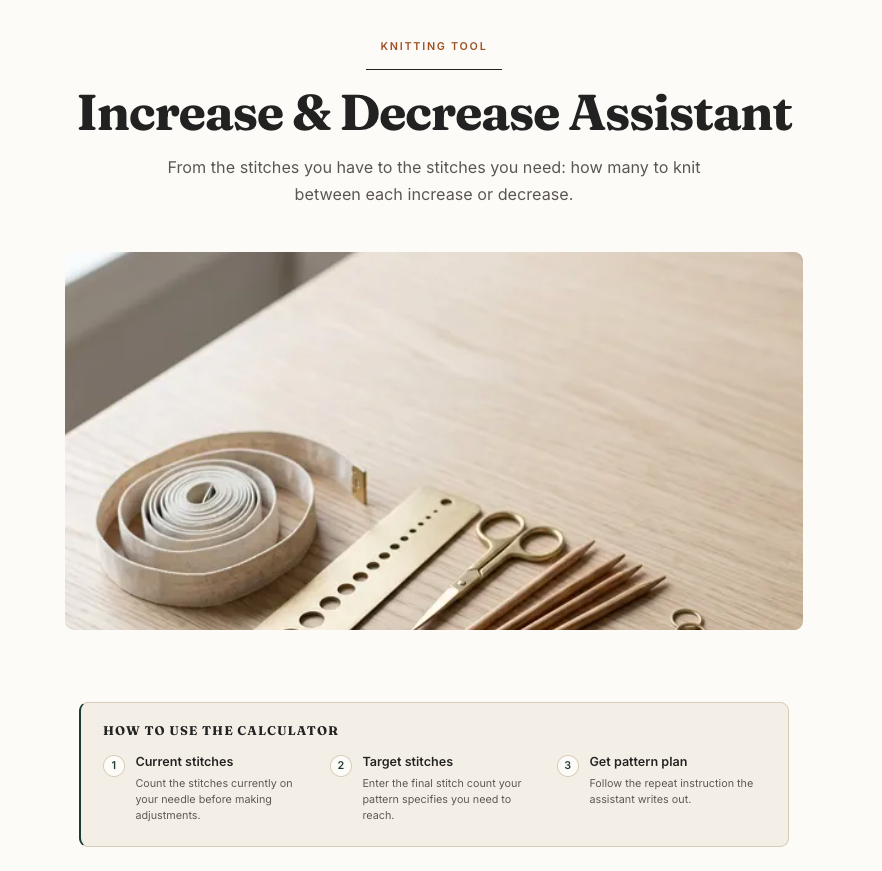


Likes:
The layout and colours are lovely. The tool looks great.
I like that they are going with "Stitches now" and "Stitches after" and eliminating the need for an increase-decrease toggle.
The image isn't obviously AI-generated. It might be, but I can't tell from looking at it.
I think the "How to use the calculator" box is probably helpful to many users.
They have a short discussion on common increase stitches and common decrease stitches.
I like that they have a small FAQ section that explains what they mean by "increase evenly" and gives advice on invisible increases.
I love that they have a "Share" option and a "Save PDF" option.
Dislikes:
While the user input form is excellent, I think the presentation of the actual solution is lacking. It doesn't have a visual aid or offer much reassurance to the user that this is the most balanced solution.
It doesn't specify whether this solution is for knitting flat or in the round.
It also doesn't specify whether the solution is for an M1 increase or a KFB increase (and the two warrant different solutions!)
Actually, the solution does seem to say that it's only for M1, though this isn't made very clear; it appears in a small, easy-to-miss note at the bottom.
The solution ends on an increase. That would be problematic if using M1 increases and knitting flat.
I don't think they way they've written out the solution makes it easy to follow while knitting.
Conclusion:
While the site is beautiful and the user input form provides a lot of clarity, there are some important things missing.
NEW
1.10 paper moon knits
Another site with a 2026 footer. Possibly new (though footers aren't necessarily the source of truth for this).

Likes:
I love that there is a toggle for flat versus in-the-round!
Once you enter your inputs, a toggle for increase method appears! I love the copy in this toggle; it's very helpful and self-explanatory.

Dislikes:
I know this is going to sound so nitpicky, but the font is quite boring, stiff, and corporate looking. It's not fun and pretty! I expect fun and pretty for this. I suppose that's because it's a hobby, and thus it's something people are doing for fun. I want a bit more whimsy!
The input form has a lot of redundancy: if the user enters a current stitch count and target stitch count, then an increase-decrease toggle is redundant. If the user enters a current stitch count and stitches to increase/decrease by, then entering a target stitch count is redundant.
I'm not sure where the "3/3" edge stitches come into play.
I think the pattern instructions could be more readable, and presented in a way that's easier to follow as the user is knitting.
Conclusion:
Of all the sites I've looked at, this one feels the most like it's made by an expert knitter. This is mostly due to the treatment of flat versus in-the-round and M1 versus KFB. But I think its presentation of the solution could still be better!
NEW
1.11 KnitCalcs.uk
Yet another 2026 footer. So I'm assuming this is another relatively new site.

Likes:
The default text in the input boxes is helpful.
The layout has a clear division between the input form and the help text.
Nice colour scheme.
It has a "Copy results" feature and a "Print results" feature.

Dislikes:
The increase and decrease calculators are completely separate.
The calculators are sorted into categories, and I wasn't sure which one would contain the increase-decrease calculator. I first tried "Shaping & Construction" but didn't find it there. Then I tried "Stitch Counts" and found it. Bit of a faff.
Nothing about flat versus in-the-round.
Nothing about M1 versus KFB.
The instructions are quite unclear! They couldn't even be bothered to tell you when to knit 6 and when to knit 7 . . . which seems like almost the whole point of using a calculator.
Conclusion:
There's definitely still room for a knitting increase calculator.
2 iOS Apps
2.1 KnitCompanion

The app seems to get roughly one update per year (based on the page in the App Store). No major changes from what I can tell. I'm not willing to pay a subscription, and I used up my free trial last time. So I can't look at the knitting calculators. Additionally, this app is overkill to use just for a simple knitting calculator.
Conclusion:
There's still room in the world for another knitting increase calculator.
2.2 Knitting Calculator --> Stitch Even

They've changed their name and updated their app icon. In fact, it looks like they've updated the whole UI look and feel, and it looks lovely.
It still costs £2.99, though, so I'm not going to bother downloading it. Once again, I'll just assess it based on the app photos.
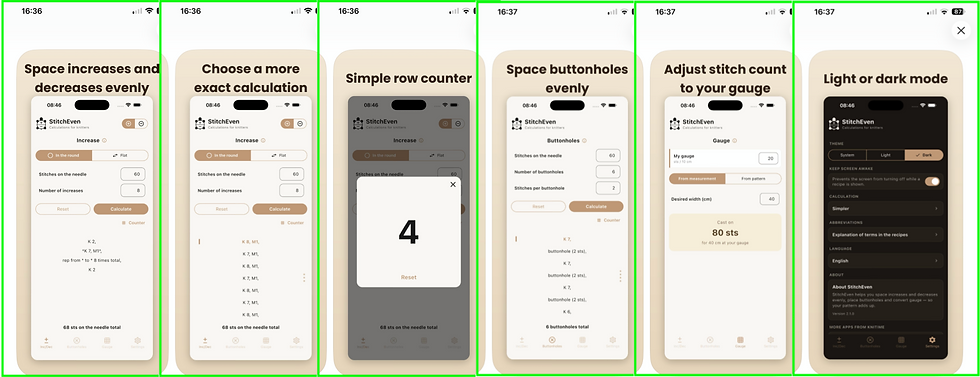
Likes:
I like the new smaller increase-decrease toggle! Takes up less screen real estate.
There is now a flat vs in-the-round toggle!
I think the new copy "Stitches on the needle" is clearer than the previous copy ("No. of stitches")
I think the new copy "Number of increases" is clearer than the previous copy ("No. to increase")
Dislikes:
I still think the appearance of the solution needs a lot of work.
I have no idea what the "# Counter" might do.
I'm not sure what that third screenshot is trying to show me.
Conclusion:
As this app costs money, there's definitely still room in the world for another knitting increase calculator.
2.3 Knit Tools

No updates since my last report.
Conclusion:
There's still room in the world for another knitting increase calculator.
2.4 Knit & Note

This app is more than just a knitting increase & decrease calculator, but that's the only bit I'm interested in. When I went to check if the calculator had any updates, it had been put behind a paywall! So this calculator is no longer free (though it has a 14-day free trial). I signed up for the free trial so I could see if the increase-decrease calculator has changed at all. However, it exactly matches my previous screenshot. So no changes, other than it now costs money.

Conclusion:
Since this increase-decrease calculator is not free, there's still room in the world for another knitting increase calculator.
NEW
2.5 Flik

This app seems to have appeared on the App Store about 1 year ago (based on the Version History listed on its AppStore page). It is available in English and in Icelandic, so I'm guessing the developer is Icelandic.
This app is also not free, though it gives you 5 free calculations.

I tried out the increase-decrease calculator and I felt its UI was quite confusing! The app prompts for the number of stitches on my needles.

After I hit "Next" I thought I had tapped the wrong button or entered something invalid. Mostly because the text field I'd just entered text in was now empty. Here's what I saw:

It took a while for me to register:
the new "Your input" section at the top
the newly appeared "Stitches on needles after increasing 52" copy underneath the text field. (That copy is also quite confusing.)
and that the text field now said "Increases" instead of "Stitches on the needles"
After I entered "8" in the now-empty text field and tapped the "Results" button, I was presented with a solution:
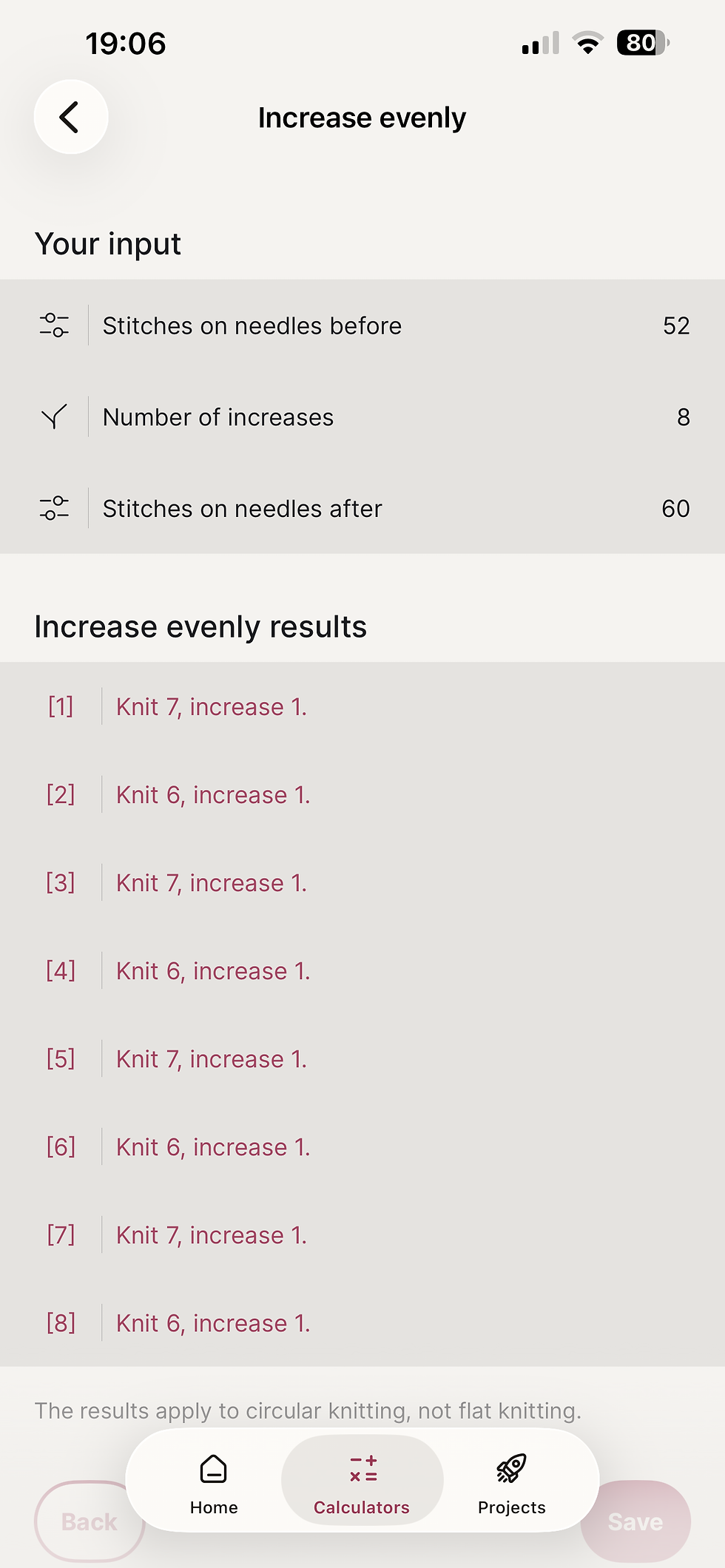
Likes:
I like that your original input is visible at the top. You don't have to navigate back to double-check you entered the correct numbers.
I like that your input is in a clearly separate section. The clear distinction makes it easy to parse this page quickly.
The solution is good!
Dislikes:
I feel it's slightly odd that the results are for circular knitting only and not flat, and that the user doesn't get to choose between the two.
When I first saw it, I thought I'd missed a toggle somewhere and went back to previous screens to check I hadn't missed anything.
The text clarifying that the result is for circular knitting only is small, light, and at the bottom. It could be easily missed!
No help regarding M1 versus KFB.
I think it's kinda weird to use the "[]" brackets around the numbers. I mean it works and all, but it's not very pretty!
Conclusion:
Since this increase-decrease calculator is not free and the UI is a bit confusing, there's still room in the world for another knitting increase calculator.
NEW
2.6 Knit & Calc

This app showed up on the iOS AppStore a little less than a year ago. It seemed to have pretty regular updates for the first 5 months, and then no updates in the last 6. It's more than just an increase-decrease calculator, but that's the only bit I'm interested in.
Likes:
The app icon is pretty. I like the colours. Not sure I'm crazy about the "KC" (hard to explain why).
The UI is intuitive.
The UI is pleasant: I like the app colours. The screens are calm and uncluttered. Nothing is overwhelming or chaotic.
I like that there is an increase-decrease toggle rather than two separate calculators.
Definitely not a terrible solution to the 52 + 8 problem! (Shown below) Super balanced if not perfectly symmetric.
In the solution section, I'm actually loving the + and - buttons that control the checkboxes and update your current stitch count. That's a really helpful UI!
Perfect solution when I tested 52 + 8 in the round.
Dislikes:
I'm not sure that "Flat" and "Circular" are the best choice of words. It's a bit inconsistent. "Flat" refers to an approach to knitting a fabric, whereas "circular" refers to a type of needle. You can knit flat or in the round. And you can use straight needles or circular needles. Additionally, I think there's potential for confusion: someone might select circular if they are using circular needles - but they might still be knitting flat! I always use circular needles, regardless of whether I'm knitting flat or in the round. A lot of knitters do!
No help with M1 vs KFB.
There's no visual reassurance that the given solution is balanced.
Conclusion:
This app is really good! And free! It's newish to the App Store and had pretty regular updates for the first 6 months, so it might only get better. I think there is just barely room in the world for another knitting increase calculator!
Conclusion
There are many more knitting increase calculators than there were when I first did this research, and I expect that number to keep growing. Knitting appears to be attracting a younger audience, while AI-assisted development is making it easier to build and publish small tools. But having more calculators available does not necessarily mean the problem has been fully solved.
The gap is certainly narrower than it was two years ago, but I still see room for the calculator I want to build: one that uses clear, familiar knitting language; helps users choose between different increase and decrease methods; produces clear instructions; and is maintained by a real person who listens to feedback. As both a knitter and a software developer, I’m well placed to build it.
A more crowded market does mean that discoverability will matter more than I originally expected. I’ll eventually need to think about search visibility, the App Store listing, and how to help the right knitters find my calculator among all the alternatives. But that is a problem for later. Right now, I don’t even have a product to market!


Comments